After 20 years, I am returning to my roots.

Life, and professional life too, occasionally takes interesting turns. Over 20 years ago, a door opened and launched me on a career in IT. I turned my back on my field of research and focused from then on on bits and bytes instead of amino acids and gene sequences. What followed was an amazing time of disruptive technological change. I was able to witness the triumph of virtualization from the very beginning and was a VMware fan from the beginning. I still remember very clearly the first migration of a VM with vMotion. It was a kind of magic and would fascinate me for the next 20 years.

Over the past year, profound changes in the world as we know it have once again become apparent. We are once again witnessing a radical transformation in the world of data centers. The market and technology leader of the last two decades is strategically realigning itself and the cards are being reshuffled. Many customers are no longer willing to go down this new path, or simply cannot afford to do so. I’m not talking about small customers here, but about upper mid-sized companies with up to 100 hosts and several thousand VMs. It’s time to recognize the iceberg on the horizon and make another course correction.

After two decades of intensive work as a freelance IT consultant, virtualization architect, and passionate trainer, I am starting a new chapter. In January 2026, I will take up a position at the Center for Organismal Studies (COS) at Heidelberg University—marking a return to my scientific roots.

A review

Over a period of more than 20 years, I have built up my expertise in the field of IT infrastructure and VMware virtualization and, as a freelancer, have supported numerous companies in setting up and modernizing their data centers, implementing cloud strategies, and operating hybrid environments.

VMware vExpert

The vExpert program not only opened the door to one of the friendliest global IT communities, but also boosted my reach and networking opportunities. For a long time, I considered my blog to be rather insignificant. It was only the encouragement of others that prompted me to join the program. Since my first application in 2017, I have been awarded the vExpert designation nine times in a row in several disciplines.

vExpertPro

The vExpert Pro initiative was launched to pave the way for new talents to join the vExpert community. Like me before, many potential candidates lacked external encouragement. A vExpert Pro is a mentor who prepares interested parties for their application and helps them maintain their status.
VMware Certified Instructor (VCI)

It is not only my passion to discover new things, but also to pass on the knowledge I have gained. That is why I have been a certified VMware trainer since 2018. It is a passion that I have pursued with particular joy. Being a trainer also meant always having to (and being allowed to) deal with the latest technologies. I considered it a privilege to come into contact with technological innovations very early on and (after an agreed embargo period) to write about them.

VMUG Germany

The VMware User Group (VMUG) is a community of VMware customers and users for direct exchange of experiences.

Together with my two fellow leaders Markus Gehm and Jens Klasen, I head up the VMUG group in Kaiserslautern and organize regular vCommunity meetings there. Regardless of my move, this will not change in the foreseeable future.

Continue reading “After 20 years, I am returning to my roots.”

Retrofitting existing vSphere clusters with a TPM chip

The growing threats in the IT sector and the increasing demands on system security have led many companies to rethink their existing infrastructure. For customers operating older VMware vSphere clusters, retrofitting with TPM 2.0 chips offers an effective way of modernizing the security architecture. TPM 2.0 provides the basis for improved system trustworthiness by securely storing cryptographic keys and detecting system tampering at an early stage.

What is TPM?

The Trusted Platform Module (TPM) is a hardware-based security chip that is installed in computers and other devices. It is used to securely store cryptographic keys, for authentication and to protect sensitive data. TPM supports security functions such as device encryption, secure booting and system integrity checks.

Why TPM

In my role as a data center architect and senior consultant, I come across a variety of different customer environments. On the one hand, many of these environments are brand new and state of the art, but there are also numerous older clusters that have been in operation for five or more years. This does not necessarily have to be a disadvantage, as these older clusters are often very well tailored to the specific requirements of the respective customers. They have no performance bottlenecks and hardware support is guaranteed. Against this background, the question arises as to whether an investment in new hardware is actually necessary.

A key advantage of modern hardware security modules is the integration of Secure Boot, a technology that ensures that only signed and trusted software is loaded at system startup. This significantly reduces the risk of malware or unauthorized boot loaders interfering with the boot process. This not only enables companies to better ward off attacks at firmware level, but also to ensure that all subsequent software components come from a secure and verified source.

In this blog post, I explain why retrofitting with TPM 2.0 in older VMware vSphere environments is an important step – and how the combination with Secure Boot makes an essential contribution to protecting modern IT infrastructures.

We will see what steps need to be taken to retrofit existing systems with TPM chips without reinstalling the ESXi host.

Continue reading “Retrofitting existing vSphere clusters with a TPM chip”

Set password policy for VMware Linux appliances

The point of changing passwords regularly is debatable. I think that forcing users to assign a new password every x days, which must be very different from the previous one, is counterproductive. But that’s another topic.

The scenario I want to talk about looks like this: a non-production lab environment where the password always expires when you have more important things to do. Appliance xy gives me the virtual middle finger and forces me to enter a new password, which must contain at least 5 special Klingon characters. Grrr! This is a non-productive lab and I use the same password for all – yes, all – services and logins. It’s about feasibility – not security.

Before anyone gets me wrong: 
Yes, in production that would be a very stupid idea.

Password Expiration

The first step is to set the password expiry time to zero (caution! not for VCF!) or a very long period of time. By default, I set 9000 days here. That’s the equivalent of about 24 years and 7 months. That should be enough 😉

Often this value cannot be configured in the GUI. Then the CLI is required. In most Linux variants, the setting is hidden in a configuration file called login.defs. We can make a quick query on the shell.

cat /etc/login.defs | grep PASS

PASS_MAX_DAYS 90
PASS_MIN_DAYS 0
PASS_MIN_LEN 8
PASS_WARN_AGE 7

Voila! PASS_MAX_DAYS is our password expiration time.

We have to use vi in order to make changes, as other editors are rarely available in these systems. But don’t be scared of vi. It’s actually quite nice. 🙂 We open the configuration file with:

vi /etc/login.defs

Now keep calm and just press the i key (for insert). Now look for the line with PASS_MAX_DAYS and change the value to 9000, for example. If you wish, you can also set the minimum age PASS_MIN_DAYS to 0. This allows the password to be changed again without waiting.

To save our changes, press the ESC key and then the key with the colon. A colon appears at the bottom left, indicating that we are in command mode. We enter the characters wq (write, quit) and press Enter.

Special case NSX-T with VCF

The expiry time of the predefined accounts admin, root and audit under NSX-T are set on the shell of the NSX manager with a separate command. To do this, you connect to the virtual IP (VIP) of the management cluster via SSH and you’ll be forwarded to the current master node.

To set the expiry time of the three accounts to 9000 days, enter the following three commands:

set user admin password-expiration 9000
set user root password-expiration 9000
set user audit password-expiration 9000

In NSX-T environments without VCF, the password expiry times may be completely deactivated.

Attention! With NSX-T in conjunction with VCF, however, this leads to problems during the upgrade. For the sake of completeness, here are the commands for deactivation:

clear user admin password-expiration
clear user root password-expiration
clear user audit password-expiration

Control

The expiry time in NSX-T can be queried with these commands:

get user admin password-expiration
get user root password-expiration
get user audit password-expiration

Password History

Normally the above changes are sufficient. However, if we have missed the expiration date and had to set a new password when logging in, we cannot switch back to our old password. The system remembers a defined number of recent passwords and does not allow recycling. But we can change this too. In many Linux variants, there is a daemon for pluggable authentication modules (pam.d). The configuration is located under /etc/pam.d/common-password. Systems with root access can also have the configuration in /etc/pam.d/system-password instead.

vi /etc/pam.d/system-password

Here I set the value remember=0. This allows the desired password to be reset immediately. As root user, the command on the shell is sufficient:

passwd

2024 – Time to say goodbye to cherished resources at VMware

For years I have been teaching students in my VMware courses to memorize only a few important URLs.

  • docs.vmware.com
  • configmax.vmware.com
  • VMware HCL
  • core.vmware.com

Following the takeover by Broadcom, there are understandable changes here. We take a look at where the individual sources of information have gone and which ones remain available.

Goodbye Docs – Hello Techdocs

If you visit the VMware Docs page today (December 2024), the following information catches your eye:

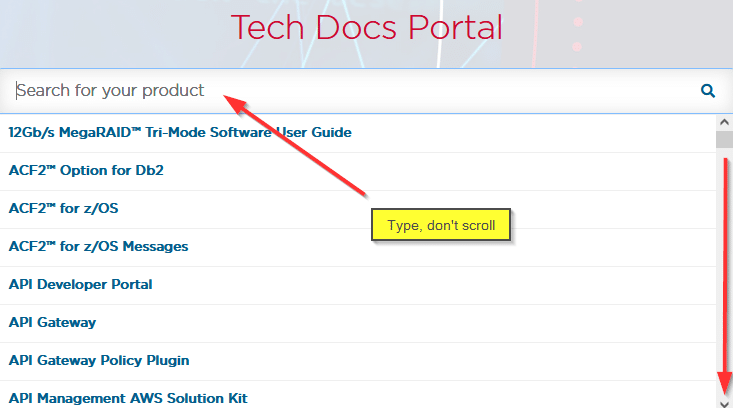
After December 31, 2024, the site will go offline and in future information will have to be obtained via the Broadcom Techdocs site. Here you will not only find VMware information, but documents on almost all products that Broadcom has in its portfolio. Don’t bother scrolling down to the letter “V”. That is a waste of time. Instead, type in the name of the product you are looking for.

PDF Export?

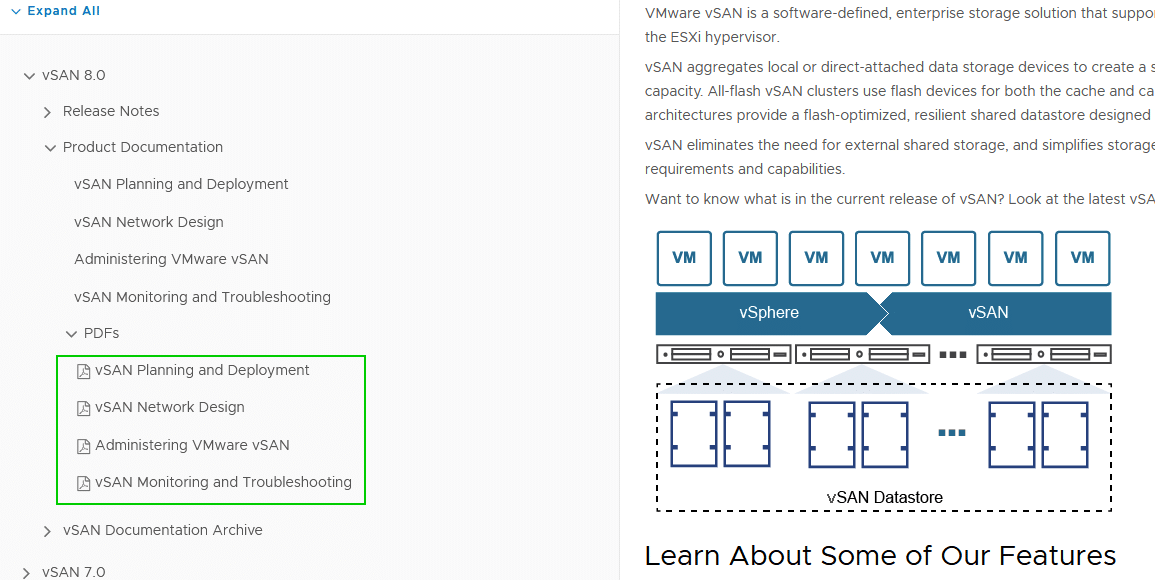
One feature that I really appreciated about the previous VMware documentation was the pleasantly readable HTML continuous text, the clearly structured outline and the optional export of the documentation as a PDF.

The continuous text and the outline are available in the Techdocs portal, but the download as PDF is missing. Maybe the link exists and I just haven’t found it yet. If someone finds it -> please send an info in the comments.

Configmax

The link to configmax.vmware.com no longer works at all. Instead of a redirect, there is only a timeout. Too bad.

The new resource can be accessed at https://configmax.broadcom.com.

Fortunately, it looks exactly the same as before – only the TLD has changed.

VMware HCL

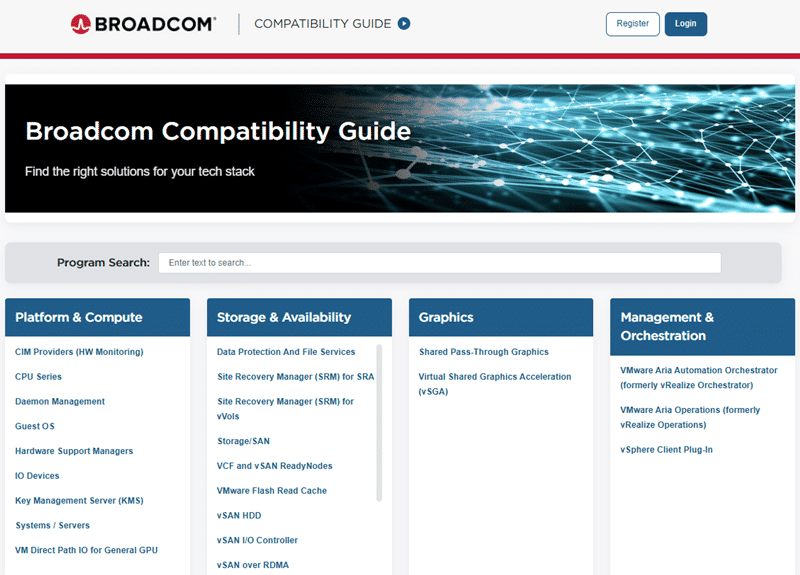
The VMware Host Compatibility List (HCL) has always been the central point of contact in cluster design. Where has it gone? It is no surprise that it has also been migrated under the Broadcom TLD. The new URL is https://compatibilityguide.broadcom.com

The dashboard for selecting the different Compatibility Guides is a little clearer compared to the old HCL. At the top level, we have a quick selection grouped according to application areas.

What else is (still) available

When it came to design guides, the URL core.vmware.com used to be an important starting point. If you follow the URL, you come to the VMware Resource Center. At least a redirect has been set here. The navigation is somewhat cumbersome and the search field is not very helpful. Unless you know the name of the document you are looking for. The naming of the products is also not intuitive. NSX, for example, can be found under “Networking by NSX” and vSAN under “Storage by vSAN“. Sometimes you have to play with the product filters and asset types to get to the desired destination.

I was pleased to see that the URL code.vmware.com is still accessible and filled with content. We’ll see how long.

As the above-mentioned resources are still under the vmware.com TLD, it will only be a matter of time before they move to the broadcom.com TLD.